在centos5.2下配置mrtg监控服务器状态
在sun下编译过mrtg,图形化显示网络流量,很好用。
在centos下可以直接用yum来安装mrtg,配置比较复杂下面是简单的记录
1.yum安装
yum install net-snmp net-snmp-devel net-snmp-utils mrtg
2.snmp配置
由于mrtg的统计都是通过snmp来做的,所以一般有错误的话都是snmp没有配置好,从网上学习了一个配置文件,可供参考
vi /etc/snmp/snmpd.conf
com2sec local localhost private
com2sec mynet 192.168.16.0/24 public
com2sec public default publicgroup mygroup v1 mynet
group mygroup v2c mynet
group mygroup usm mynet
group local v1 local
group local v2c local
group local usm local
group public v1 public
group public v2c public
group public usm publicview all included .1 80
access mygroup “” any noauth exact mib2 none none
access public “” any noauth exact all none none
access local “” any noauth exact all all allsyslocation Right here, right now.
syscontact Me
proc mountd
proc ntalkd 4
proc sendmail 10 1
disk / 9689
disk /export/hd3 153327
load 12 14 14
修改完毕后重启 service snmpd start
3.配置mrtg
制作配置文件:cfgmaker –global ‘WorkDir: /var/www/mrtg’–output /etc/mrtg/mrtg.cfg public@127.0.0.1
生成网页:indexmaker -output=/var/www/mrtg/index.html -title=”k12zy.com status” /etc/mrtg/mrtg.cfg
MRTG除了统计流量之外,还可以根据snmp来统计CPU、UPTIME、内存、磁盘使用量等等,具体配置可以参考我下面提供的链接或者下面的mrtg配置文件。
配置结束后启动env LANG=C /usr/bin/mrtg /etc/mrtg/mrtg.cfg 启动三次,因为数据文件的原因前两次会报错,不用理会第三次就好了。
4.配置web服务器
配置自己的web服务器将主目录指向WorkDir,可以设置相关的权限之类的,然后通过浏览器访问就行。
5.配置自动运行
mrtg的运作方式是定时运行,每次运行生成各统计的图片和数据。即他生成的东西都是静态的,但需要经常定时运行。
加入corn 每5分钟运行一次,基本占不了什么资源。
crontab -e
*/5 * * * * env LANG=C /usr/local/mrtg/bin/mrtg /etc/mrtg/mrtg.cfg
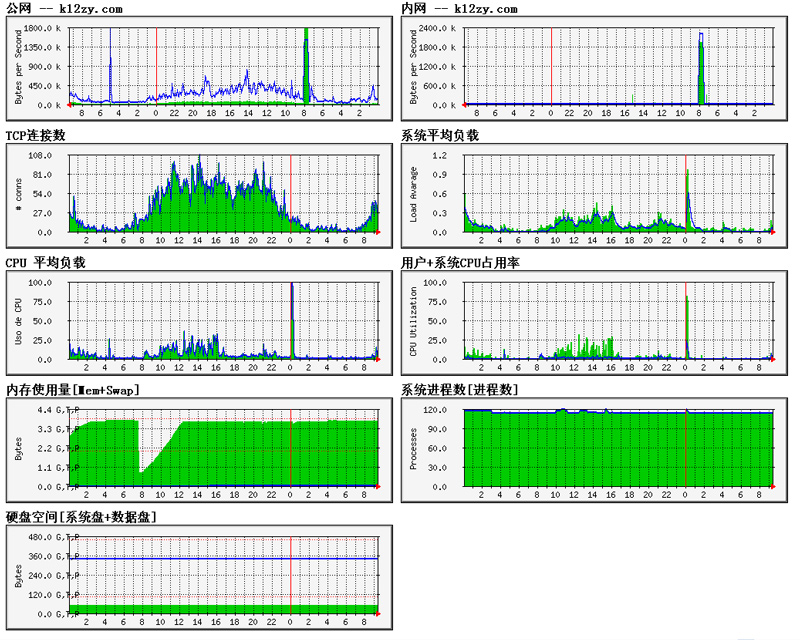
下面是我的mrtg的配置文件,包含cpu 内存 硬盘等 大家可以参考。关于硬盘需在snmp里设置好,上面配置文件里的disk / 9689,其中9689这个磁盘大小是根据df -am中的数据来设置的。
# Created by
# /usr/bin/cfgmaker –global ‘WorkDir: /export/web/www/status’ –output /etc/mrtg/mrtg.cfg public@127.0.0.1EnableIPv6: no
WorkDir: /export/web/www/status
Language: gb2312### Interface 2 >> Descr: ‘eth0′ | Name: ‘eth0′ | Ip: ‘222.132.76.204’ | Eth: ’00-1e-4f-36-d1-23′ ###
Target[127.0.0.1_2]: 2:public@127.0.0.1:
SetEnv[127.0.0.1_2]: MRTG_INT_IP=”222.132.76.204″ MRTG_INT_DESCR=”eth0″
MaxBytes[127.0.0.1_2]: 12500000
Title[127.0.0.1_2]: 公网 — k12zy.com
PageTop[127.0.0.1_2]: <h1>公网 — k12zy.com</h1>
<div id=”sysdetails”>
<table>
<tr>
<td>Description:</td>
<td>eth0 </td>
</tr>
<tr>
<td>ifType:</td>
<td>ethernetCsmacd (6)</td>
</tr>
<tr>
<td>ifName:</td>
<td>eth0</td>
</tr>
<tr>
<td>Max Speed:</td>
<td>12.5 MBytes/s</td>
</tr>
<tr>
<td>Ip:</td>
<td>222.132.76.204 ()</td>
</tr>
</table>
</div>
### Interface 3 >> Descr: ‘eth1′ | Name: ‘eth1′ | Ip: ‘192.168.16.99’ | Eth: ’00-1e-4f-36-d1-25′ ###Target[127.0.0.1_3]: 3:public@127.0.0.1:
SetEnv[127.0.0.1_3]: MRTG_INT_IP=”192.168.16.99″ MRTG_INT_DESCR=”eth1″
MaxBytes[127.0.0.1_3]: 125000000
Title[127.0.0.1_3]: 内网 — k12zy.com
PageTop[127.0.0.1_3]: <h1>内网 — k12zy.com</h1>
<div id=”sysdetails”>
<table>
<tr>
<td>Description:</td>
<td>eth1 </td>
</tr>
<tr>
<td>ifType:</td>
<td>ethernetCsmacd (6)</td>
</tr>
<tr>
<td>ifName:</td>
<td>eth1</td>
</tr>
<tr>
<td>Max Speed:</td>
<td>125.0 MBytes/s</td>
</tr>
<tr>
<td>Ip:</td>
<td>192.168.16.99 ()</td>
</tr>
</table>
</div>########################### TCP Cons ######################################
Target[tcpopen]: .1.3.6.1.2.1.6.9.0&.1.3.6.1.2.1.6.9.0:public@127.0.0.1
Options[tcpopen]: nopercent,growright,gauge,noinfo
Title[tcpopen]: TCP连接数
PageTop[tcpopen]:<H1>TCP连接数</H1>
#Open TCP connections
MaxBytes[tcpopen]: 1000000
YLegend[tcpopen]: # conns
ShortLegend[tcpopen]: 连接
LegendI[tcpopen]: 连接:
LegendO[tcpopen]:
Legend1[tcpopen]: 打开的连接######################## Load Avarage ####################################
LoadMIBs: /usr/share/snmp/mibs/HOST-RESOURCES-MIB.txt
Target[load]:.1.3.6.1.4.1.2021.10.1.3.2&.1.3.6.1.4.1.2021.10.1.3.3:public@127.0.0.1 * 100
WithPeak[load]: my
MaxBytes[load]: 10000
Title[load]: SYSTEM LOAD AVG.
Options[load]: growright,gauge,integer,nopercent
YLegend[load]: Load Avarage
LegendI[load]: 5 min:
LegendO[load]: 15 min:
Legend1[load]: Load average for 5 Min
Legend2[load]: Load average for 15 Min
Legend3[load]: Max load average for 5 Min
Legend4[load]: Max Load average for 15 Min
YTicsFactor[load]: 0.01
#ShortLegend[load]: _
PageTop[load]:<H1>系统平均负载</H1>
#LOAD AVERAGE
######################### CPU ############################################
LoadMIBs: /usr/share/snmp/mibs/UCD-SNMP-MIB.txt
Target[cpu]:ssCpuRawUser.0&ssCpuRawUser.0:public@localhost + ssCpuRawSystem.0&ssCpuRawSystem.0:public@localhost + ssCpuRawNice.0&ssCpuRawNice.0:public@localhost
RouterUptime[cpu]:public@localhost
MaxBytes[cpu]: 100
Title[cpu]: CPU Load
PageTop[cpu]:<H1>CPU 平均负载</H1>
#Carga de CPU %
Unscaled[cpu]: ymwd
ShortLegend[cpu]: %
YLegend[cpu]: Uso de CPU
Legend1[cpu]: CPU Activa % (Carga)
Legend2[cpu]:
Legend3[cpu]:
Legend4[cpu]:
LegendI[cpu]: Active
LegendO[cpu]:
Options[cpu]: growright,nopercent######################## CPU UsrSys ####################################
LoadMIBs: /usr/share/snmp/mibs/UCD-SNMP-MIB.txt
Target[usrsys]:ssCpuRawUser.0&ssCpuRawSystem.0:public@localhost
RouterUptime[usrsys]:public@localhost
MaxBytes[usrsys]: 100
Title[usrsys]: CPU LOAD
PageTop[usrsys]:<H1>用户+系统CPU占用率</H1>#CPU (user and system) Load %
Unscaled[usrsys]: ymwd
ShortLegend[usrsys]: %
YLegend[usrsys]: CPU Utilization
Legend1[usrsys]: 用户 CPU % (Load)
Legend2[usrsys]: 系统 CPU % (Load)
Legend3[usrsys]:
Legend4[usrsys]:
LegendI[usrsys]: 用户
LegendO[usrsys]: 系统
Options[usrsys]: growright,nopercentTarget[memory]: .1.3.6.1.2.1.25.2.3.1.6.2&.1.3.6.1.2.1.25.2.3.1.6.3:public@localhost:
Options[memory]: gauge,growright
Directory[memory]: mem
MaxBytes1[memory]: 4045336
MaxBytes2[memory]: 2097152
Kmg[memory]: k,M,G,T,P
Kilo[memory]: 1024
Unscaled[memory]: dwym
YLegend[memory]: Bytes
ShortLegend[memory]: B
Legend1[memory]: Mem (Bytes)
Legend2[memory]: Swap(Bytes)
LegendI[memory]: Mem :
LegendO[memory]: Swap:
Title[memory]: 内存使用量[Mem+Swap]
PageTop[memory]: <H1>内存使用量[Mem+Swap]</H1>
Target[process]: .1.3.6.1.2.1.25.1.6.0&.1.3.6.1.2.1.25.1.6.0:public@localhost:
Options[process]: gauge,nopercent,growright
Directory[process]: process
MaxBytes[process]: 1000
YLegend[process]: Processes
ShortLegend[process]: 个
Legend1[process]: 系统进程数(个)
Legend2[process]:
LegendI[process]: 进程数:
LegendO[process]:
Title[process]: 系统进程数[进程数]
PageTop[process]: <H1>系统进程数[进程数]</H1>Target[disk]: .1.3.6.1.4.1.2021.9.1.8.1&.1.3.6.1.4.1.2021.9.1.8.2:public@localhost:
Options[disk]: gauge,growright
Directory[disk]: disk
MaxBytes1[disk]: 9921536
MaxBytes2[disk]: 157006848
Kmg[disk]: k,M,G,T,P
Kilo[disk]: 1024
Unscaled[disk]: dwym
YLegend[disk]: Bytes
ShortLegend[disk]: B
Legend1[disk]: 系统盘已用空间
Legend2[disk]: 数据盘已用空间
LegendI[disk]: 系统已用:
LegendO[disk]: 数据已用:
Title[disk]: 硬盘空间[系统盘+数据盘]
PageTop[disk]: <h1>硬盘空间[系统盘+数据盘]</h1>
效果图
参考:
http://blog.chinaunix.net/u/18377/showart.php?id=267406
http://rootchen001.blog.163.com/blog/static/18799622200771724333211/